
Best AI video generators 2026, picked by a creative director
The best AI video generators in 2026 depend on the job. My picks: Seedance 2.5 for product films, music videos and long shots, Kling for people and UGC, Gemini Omni Flash for changing real footage, and Higgsfield Genjutsu for swapping one thing in a clip you already have. Veo, Runway and Sora get searched a lot too, so they're below with what their makers say about them.
Most lists of the best AI video generation tools rank a dozen models by specs. That doesn't help when a brand is waiting on an ad. I pick by the shot: what has to hold up in this clip, and which model holds it.
These are the tools I use, what I use each one for, and how to stop them eating your credits. Prices and limits come from each company's own pages, checked 17 November 2026.
The short list
- Seedance 2.5: best overall. Long shots, product films, music videos, anything with a story.
- Seedance 2.0: batches of product ads from one locked shot.
- Kling: people. UGC, acting, motion control, text that stays sharp.
- Gemini Omni Flash: real footage you want to change with words.
- Higgsfield Genjutsu: one thing swapped in a clip that already works.
- Also searched: Veo 3.1, Runway and Sora. Covered further down.
1. Seedance 2.5: best overall
Seedance 2.5 is the best AI video generator I've used, and it's the expensive one. It makes up to 30 seconds in a single generation, so a whole scene can be one take with the cuts written into the prompt as timed shots. Every scene in my Monster spec ad is one generation of 6 to 30 seconds. The flying Tesla was made with it on Higgsfield.
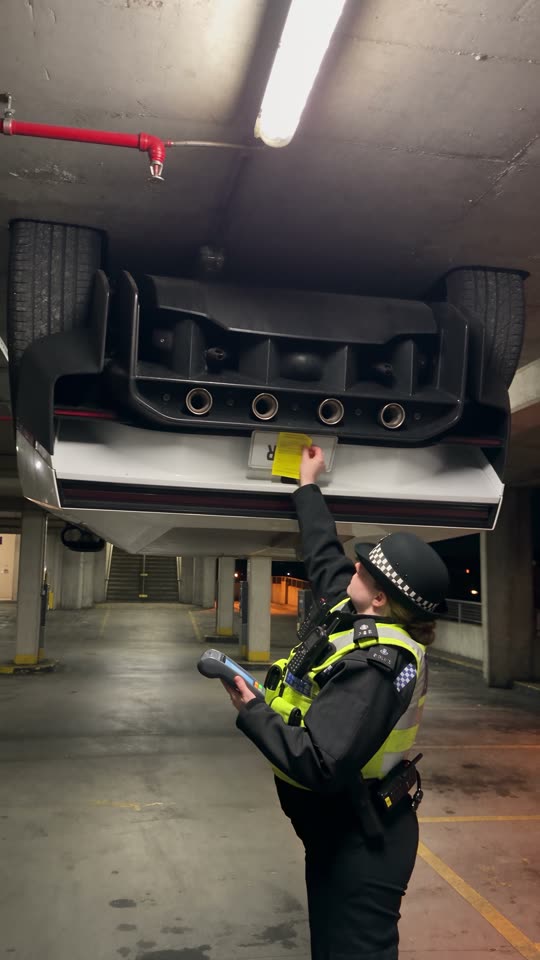
Where people lose money is asking for the character, the camera, the physics, the style and the sound in one breath, then paying to fix the result. Give each problem its own prompt. Fix one thing, protect what already works, generate again. The Seedance prompt pack has seven prompts built that way, and the flying Tesla breakdown shows the whole system. The method is written up in realistic AI video that looks like phone footage.
On Higgsfield's own figures, a 10 second Seedance 2.5 clip is 30 credits at 480p and 70 at 720p, and the model starts on the $49 plan with 1,000 credits.
2. Seedance 2.0: batch product ads
In July I made 40 product ads for my own brand in under an hour on Seedance 2.0. The move that makes it work: drop a three second clip of a camera move you like into the video reference slot and it puts that move on your product. Set a genre, switch bitrate to high, run the batch in 4K.
Never write "cinematic". That word is the AI look. The full method is in product ads with Higgsfield and Seedance and Seedance 2.0 prompts for product ads.
3. Kling: people, UGC and motion control
Most AI breaks on humans and Kling holds up. It's what I reach for when a person has to move, talk or act. Kling 3.0 brought multi-shot sequences with the same actor, second by second control and actor emotions you can direct. Its motion control lets a video of you drive an AI character, which is how the AI UGC mini guide works: make the face, film yourself on your phone, put the two together.
Two rules from my own UGC method: one person per clip, and test at 720p before you keep anything at 1080p. For text that has to stay sharp in motion, like a label or a sign, I've used Kling because other tools warped the letters. It also takes precise camera direction: the drone shot prompts were made on Kling 2.6.
The full UGC route is in AI UGC ads that look filmed at home.
4. Gemini Omni Flash: change real footage with words
Omni Flash is the one that does what you write. I gave it one frame from a real news clip of two climbers hanging a banner, plus a written shot description. It came back with 10 seconds of fake news footage where they open bat wings and jump. The banner text never warped, and the helicopter sound and radio chatter were generated with the video.
Google's current version, Omni 1.2 Flash, makes clips of 3 to 15 seconds and edits an existing clip through conversation, like a new background or different light, without rebuilding the whole thing. It's in Google's Flow and Vids, in the Gemini app on the Ultra plan, and on Higgsfield, where I used it.
5. Higgsfield Genjutsu: swap one thing, keep the take
Genjutsu changes part of a clip you already have. Motion Transfer keeps the movement and camera and rebuilds the scene. Object Swap replaces one element, a product, an outfit or a person, and leaves the rest as filmed. In my UGC method it's the route for when you want your real room exactly as it is, with only the person changed. Higgsfield Genjutsu: what it is and how to use it has the steps and the cost.
Also searched: Veo, Runway and Sora
These three come up in every search for the best AI video generators. They aren't my daily picks, so here's what I can honestly say about each.
- Google Veo 3.1. Google's docs list clips of 4, 6 or 8 seconds, from 720p up to 4K, with audio always on and up to three reference images. In the Gemini app it sits on the Google AI Ultra plan. I've used Veo 3 on a Pixel for pre-viz, showing a client the shot before the shoot, and that was a paid partnership with Google Pixel. Veo set the standard for people speaking with real room sound. Most leading models now make sound with the picture, so that gap has closed.
- Runway. I treat it as a fix-it assistant: small changes in plain English, like "change her dress to black", with full scenes built elsewhere. It also plugs into ChatGPT, which is how my Dots ad testing setup makes five new versions of a winning ad. Runway's pricing page lists a free plan with 125 one-time credits and Standard at $15 a month with 625 credits. Its Gen-4.5 model costs 60 credits per 5 seconds.
- Sora. OpenAI's own Sora pages now carry a notice that the Sora product is no longer available as of 26 April 2026. A 2026 list that still ranks it is out of date.
Draft cheap, finish expensive
This one habit saves more money than any choice of tool. Run four drafts at 480p, pick the best, and finalise only that one at 1080p. Change one thing per new draft. If it still fails after a few, change the plan.
On the Higgsfield numbers above, a 720p Seedance 2.5 clip costs more than twice the 480p one. Find the idea at the cheap setting. The Monster breakdown has the draft rule and the finishing order: grade once, upscale, grain last.
How to pick for your job
- Name what has to hold up: a product label, a face, a camera move, a line of text.
- Pick the model that holds that one thing. Use the short list above.
- Lock your stills first: the person, the product, the place.
- Draft at the lowest quality until the shot works.
- Finish only the keeper, upscale it, and add grain last.
If you're starting out, a platform with many models in one place, like Higgsfield, lets you test several on the same job with one subscription. The AI video stack shows how I layer tools on a client campaign.
Questions
What is the best AI video generator in 2026?
For most paid work, Seedance 2.5. It makes up to 30 seconds in one generation, so a whole scene can be one take with the cuts written into the prompt. It's also the expensive one, so draft at 480p and finish only the take you keep.
Which AI video generator is best for realistic people?
Kling. Most AI breaks on humans and Kling holds up. Its motion control lets a phone video of you drive an AI character, which is the base of most AI UGC. Keep it to one person per clip.
Is Sora still available in 2026?
OpenAI's own Sora pages carry a notice that the Sora product is no longer available as of 26 April 2026. For the same kinds of shots, look at Seedance 2.5, Kling or Google's Veo 3.1 and Omni Flash.
Picking the tool is the easy part. Build AI Creative Systems That Win Clients covers the direction that makes any of these look like paid work, and the client who pays for it. Make an Advert Film with Claude is the mini course for this, sold alone or included in the full course.